
Resolution Loop
Explore what happened before the call, who might be able to change it, and how the result could be verified.
Card limit inquiry Sankey
A request for a higher limit can lead to an immediate increase, guidance on applying for review, or other actions.
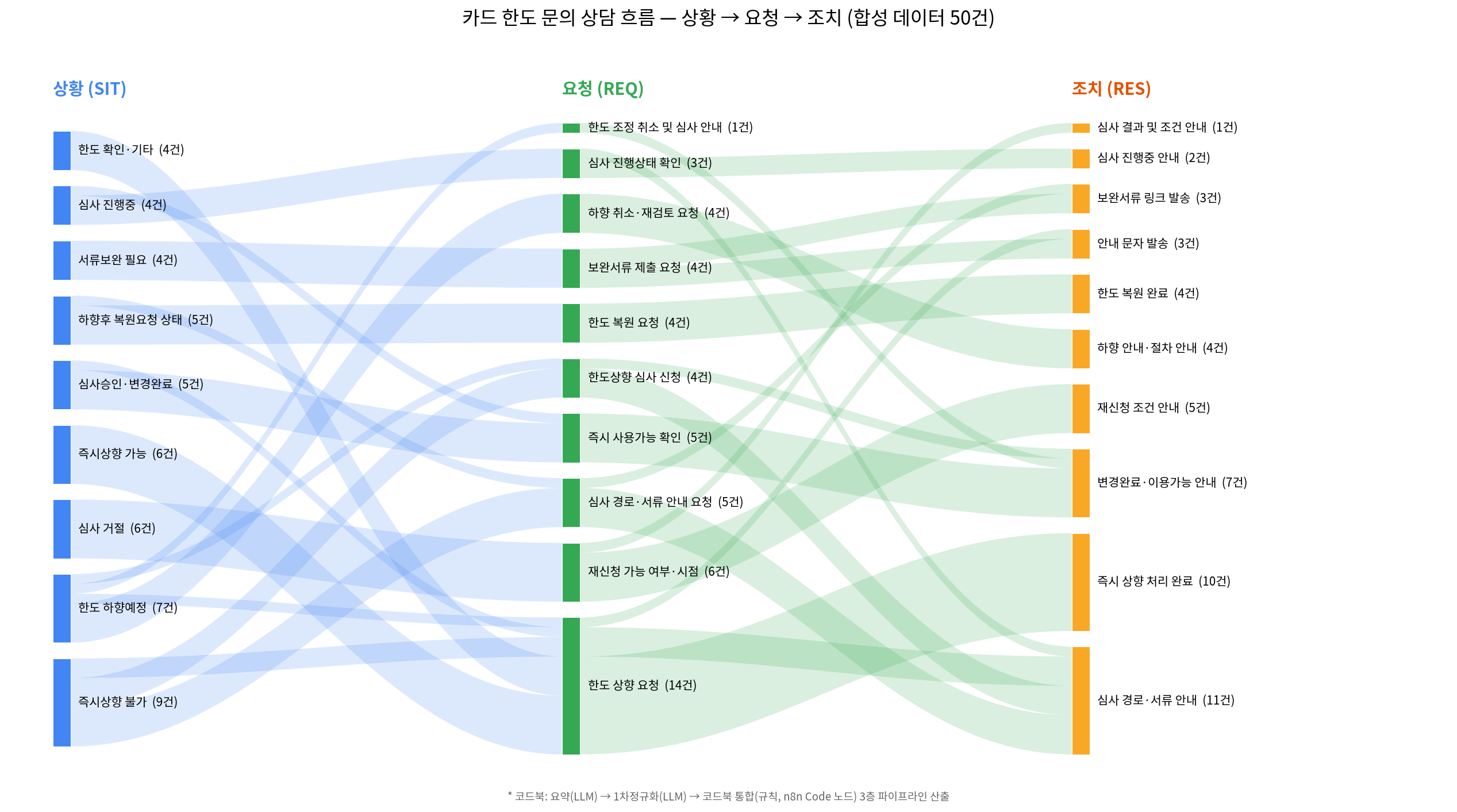
From a contact to an improvement request
Read the conversation
Limit increase / Entry point hidden
Customer“I want a higher limit. Where do I apply?”
Agent“Open Offers → Limits → Apply. I’ll send the path.”
- SIT / Situation
- Entry point hidden
- REQ / Request
- Increase my limit
- ACT / Action taken
- Share navigation
Limit increase / Review pending
Customer“I sent my application yesterday. Do I need to do anything else?”
Agent“It’s under review. We have your documents.”
- SIT / Situation
- Review pending
- REQ / Request
- Check progress
- ACT / Action taken
- Share status
Limit increase / Policy hold
Customer“I updated my income. Why is the same limit still shown?”
Agent“The new income information is on file. A separate policy condition is still open.”
- SIT / Situation
- Policy hold
- REQ / Request
- Increase my limit
- ACT / Action taken
- Explain hold
Tax documents / Document for filing
Customer“I need last year’s interest certificate. Which statement is it?”
Agent“Choose Interest Certificate in Documents and select the filing year.”
- SIT / Situation
- Document for filing
- REQ / Request
- Get a tax document
- ACT / Action taken
- Share document path
Fraud detection (FDS) / Transfer blocked
Customer“The transfer was blocked after I changed phones. Can you unlock it?”
Agent“I’ll send you to a secure identity review and explain how to track it.”
- SIT / Situation
- Transfer blocked
- REQ / Request
- Restore access
- ACT / Action taken
- Escalate securely
Separate evidence from inference
Limit increase / Entry point hidden
Observed in the synthetic record
- Prior event
- T−12m · Opened account settings; searched “limit”.
- Customer state
- Eligible; no pending application.
- Product behavior
- Visited help twice; no application start event.
Root-cause hypothesis
The eligible entry point may be hard to discover.
Evidence still needed
No start event could also indicate that the customer deferred the task. Compare eligible sessions with and without the shortcut.
Limit increase / Review pending
Observed in the synthetic record
- Prior event
- T−1d · Application submitted successfully.
- Customer state
- Review pending; documents complete.
- Product behavior
- Opened the application screen three times; status field absent.
Root-cause hypothesis
The missing status may make a normal wait feel like a failed submission.
Evidence still needed
Check the delay between the review event and its display. Separate contacts during normal waiting from overdue cases.
Limit increase / Policy hold
Observed in the synthetic record
- Prior event
- T−2d · Income update accepted.
- Customer state
- A separate eligibility condition remains unmet.
- Product behavior
- Limit screen repeated the old number without an explanation.
Root-cause hypothesis
The screen may imply that an income update alone triggers reconsideration.
Evidence still needed
Check comprehension of the eligibility copy with comparable users. Changes to eligibility itself require policy review.
Tax documents / Document for filing
Observed in the synthetic record
- Prior event
- T−5m · Opened statements from the yearly summary.
- Customer state
- Certificate available for the selected filing year.
- Product behavior
- Downloaded a transaction statement; did not open Certificates.
Root-cause hypothesis
The navigation groups documents by format while the customer looks by purpose.
Evidence still needed
Check which document people select when given a filing goal. Track wrong-document downloads as a guardrail.
Fraud detection (FDS) / Transfer blocked
Observed in the synthetic record
- Prior event
- T−25m · Device changed; transfer blocked by risk control.
- Customer state
- Identity review required; transfer remains blocked.
- Product behavior
- Retried transfer twice; saw a generic warning.
Root-cause hypothesis
The warning may leave eligible users unsure how to request a safe review.
Evidence still needed
Test whether customers can reach secure review. Monitor unsafe releases and wrongful denials together.
Choose where to intervene
Limit increase / Entry point hidden
Compare the four routes. The recommendation is a starting point for human review.
Automation
A trusted system event can trigger a repeatable action.
Self-serviceRecommended
The customer can complete an existing task given the right entry point.
Show an eligible customer a direct link beside their current limit.
Product / policy
A product behavior or policy condition shapes the problem.
Human review
Risk or ambiguity requires accountable human judgment.
Limit increase / Review pending
Compare the four routes. The recommendation is a starting point for human review.
AutomationRecommended
A trusted system event can trigger a repeatable action.
Send status changes from authoritative review events and show the next action, if any.
Self-service
The customer can complete an existing task given the right entry point.
Product / policy
A product behavior or policy condition shapes the problem.
Human review
Risk or ambiguity requires accountable human judgment.
Limit increase / Policy hold
Compare the four routes. The recommendation is a starting point for human review.
Automation
A trusted system event can trigger a repeatable action.
Self-service
The customer can complete an existing task given the right entry point.
Product / policyRecommended
A product behavior or policy condition shapes the problem.
Explain which prerequisite is open and what can be done next. Review the rule separately with policy owners.
Human review
Risk or ambiguity requires accountable human judgment.
Tax documents / Document for filing
Compare the four routes. The recommendation is a starting point for human review.
Automation
A trusted system event can trigger a repeatable action.
Self-serviceRecommended
The customer can complete an existing task given the right entry point.
Add a filing-purpose entry that leads to the eligible certificate and year picker.
Product / policy
A product behavior or policy condition shapes the problem.
Human review
Risk or ambiguity requires accountable human judgment.
Fraud detection (FDS) / Transfer blocked
Compare the four routes. The recommendation is a starting point for human review.
Automation
A trusted system event can trigger a repeatable action.
Self-service
The customer can complete an existing task given the right entry point.
Product / policy
A product behavior or policy condition shapes the problem.
Human reviewRecommended
Risk or ambiguity requires accountable human judgment.
Route to a trained reviewer with minimal context and a secure identity check.
Define the change
Limit increase / Entry point hidden
Proposed intervention
Show an eligible customer a direct link beside their current limit.
- Suggested team for review
- Digital Product
- Priority
- P2 · Product discovery
- Eligible cohort
- Eligible and viewed the limit screen.
Success condition
Submitted a limit application within 7 days.
Limit increase / Review pending
Proposed intervention
Send status changes from authoritative review events and show the next action, if any.
- Suggested team for review
- Review Operations
- Priority
- P2 · Product discovery
- Eligible cohort
- Application entered pending status with all documents present.
Success condition
Customer saw their current status and next action within 7 days.
Limit increase / Policy hold
Proposed intervention
Explain which prerequisite is open and what can be done next. Review the rule separately with policy owners.
- Suggested team for review
- Credit Policy + Product
- Priority
- P2 · Product discovery
- Eligible cohort
- Income updated while the separate condition remained open.
Success condition
Customer identified the remaining condition and available next step within 7 days.
Tax documents / Document for filing
Proposed intervention
Add a filing-purpose entry that leads to the eligible certificate and year picker.
- Suggested team for review
- Documents Product
- Priority
- P2 · Product discovery
- Eligible cohort
- Eligible certificate users entering the filing journey.
Success condition
Downloaded the intended certificate for the correct year within 7 days.
Fraud detection (FDS) / Transfer blocked
Proposed intervention
Route to a trained reviewer with minimal context and a secure identity check.
- Suggested team for review
- Fraud Operations
- Priority
- P1 · Safety review
- Eligible cohort
- Blocked transfer with a secure identity review required.
Success condition
Received a documented secure review decision within 7 days.
Check what happens next
Limit increase / Entry point hidden
Illustrative before/after comparison for the recommended intervention. Each fictional cohort contains 100 eligible customers, including people who never contacted support. Follow-up window: 7 days.
Goal completion
Repeat contact about the same issue
Goal definition · Submitted a limit application within 7 days.
Open verification checklist
- Match exposure and eligibility across comparison groups, then track the same issue across channels.
- No start event could also indicate that the customer deferred the task. Compare eligible sessions with and without the shortcut.
- Review incomplete journeys and check whether customers switched channels or abandoned the task.
Limit increase / Review pending
Illustrative before/after comparison for the recommended intervention. Each fictional cohort contains 100 eligible customers, including people who never contacted support. Follow-up window: 7 days.
Goal completion
Repeat contact about the same issue
Goal definition · Customer saw their current status and next action within 7 days.
Open verification checklist
- Match exposure and eligibility across comparison groups, then track the same issue across channels.
- Check the delay between the review event and its display. Separate contacts during normal waiting from overdue cases.
- Review incomplete journeys and check whether customers switched channels or abandoned the task.
Limit increase / Policy hold
Illustrative before/after comparison for the recommended intervention. Each fictional cohort contains 100 eligible customers, including people who never contacted support. Follow-up window: 7 days.
Goal completion
Repeat contact about the same issue
Goal definition · Customer identified the remaining condition and available next step within 7 days.
Open verification checklist
- Match exposure and eligibility across comparison groups, then track the same issue across channels.
- Check comprehension of the eligibility copy with comparable users. Changes to eligibility itself require policy review.
- Review incomplete journeys and check whether customers switched channels or abandoned the task.
Tax documents / Document for filing
Illustrative before/after comparison for the recommended intervention. Each fictional cohort contains 100 eligible customers, including people who never contacted support. Follow-up window: 7 days.
Goal completion
Repeat contact about the same issue
Goal definition · Downloaded the intended certificate for the correct year within 7 days.
Open verification checklist
- Match exposure and eligibility across comparison groups, then track the same issue across channels.
- Check which document people select when given a filing goal. Track wrong-document downloads as a guardrail.
- Review incomplete journeys and check whether customers switched channels or abandoned the task.
Fraud detection (FDS) / Transfer blocked
Illustrative before/after comparison for the recommended intervention. Each fictional cohort contains 100 eligible customers, including people who never contacted support. Follow-up window: 7 days.
Goal completion
Repeat contact about the same issue
Goal definition · Received a documented secure review decision within 7 days.
Open verification checklist
- Match exposure and eligibility across comparison groups, then track the same issue across channels.
- Test whether customers can reach secure review. Monitor unsafe releases and wrongful denials together.
- Review incomplete journeys and check whether customers switched channels or abandoned the task.